使用 Cloudflare Worker 实现无服务器加速 Github 访问
引言
GitHub 在全球范围内提供了丰富的开源资源,然而,由于某些原因,访问 GitHub 的速度可能在中国地区不尽如人意。为了改善这一问题,我们可以利用 Cloudflare Worker,通过无服务器方式加速 GitHub 访问,提供更快速、稳定的访问体验。
PS:个别地区或运营商用户可能是减速效果,不妨优选下IP或者还是直接访问吧~~
Worker 代码
由于 Github 存在多个子域名及静态资源域名,在做反向代理时,需要特殊处理下,下面的脚本统一将这些资源映射到了 gh 和 *-gh 开头的多个二级域名下。所以,需要把这些域名解析到 Cloudlare,以下两种方式选其一:
- 将 *.example.org 解析到 Cloudflare,这种方式一劳永逸,可防止后续 Github 增加子域名后导致请求错误
- 将 gh.example.org、github-assets-gh.example.org 等子域名解析到 Cloudflare,这些子域名需要根据失败的资源获取
/**
 * @author rehiy
 * @url https://www.rehiy.com/post/573/
 */

let domain = "";

const rewriteRules = [
    ["/favicon.", "", 204],
    ["/sw.js", "", 204],
    ["/robots.txt", "User-agent: *\nDisallow: /", 200],
];

export default {
    async fetch(request, env) {
        const url = new URL(request.url);
        for (const [u, b, s] of rewriteRules) {
            if (url.pathname.startsWith(u)) {
                return new Response(b, { status: s });
            }
        }
        domain = url.hostname.replace(/^[\w\-]+-gh\./, "gh.");
        return proxyRequest(url, request);
    }
};

function replaceHostname(str) {
    str = str.replace(/(\w+)\.githubusercontent\.com/g, "$1-user-" + domain);
    str = str.replace(/(\w+)\.githubassets\.com/g, "$1-assets-" + domain);
    str = str.replace(/(\w+)\.github\.com/g, "$1-" + domain);
    str = str.replace(/github\.com/g, domain);
    return str;
}

function resolveHostname(str) {
    const rd = domain.replace(/\./g, "\\.");
    str = str.replace(new RegExp("(\\w+)-user-" + rd, "g"), "$1.githubusercontent.com");
    str = str.replace(new RegExp("(\\w+)-assets-" + rd, "g"), "$1.githubassets.com");
    str = str.replace(new RegExp("(\\w+)-" + rd, "g"), "$1.github.com");
    str = str.replace(new RegExp(rd, "g"), "github.com");
    return str;
}

async function proxyRequest(url, request) {
    url.host = resolveHostname(url.host);
    url.port = url.protocol === "https:" ? "443" : "80";
    let headers = new Headers(request.headers);
    headers.set("reason", "mirror of China");
    const req = new Request(request, { redirect: "manual", headers });
    try {
        const resp = await fetch(url.toString(), req);
        headers = new Headers(resp.headers);
        headers.delete("clear-site-data");
        headers.delete("content-security-policy");
        headers.delete("content-security-policy-report-only");
        headers.set("access-control-expose-headers", "*");
        headers.set("access-control-allow-origin", "*");
        headers.set("upstream-url", resp.url);
        if (headers.has("location")) {
            const location = new URL(headers.get("location"));
            location.host = replaceHostname(location.host);
            headers.set("location", location.toString());
        }
        const ctype = headers.get("content-type");
        if (ctype && /text\/html|application\/json/.test(ctype)) {
            let body = await resp.text();
            body = replaceHostname(body);
            body = body.replace(/integrity=\".*?\"/g, "");
            return new Response(body, { status: resp.status, headers });
        }
        return new Response(resp.body, { status: resp.status, headers });
    } catch (e) {
        return new Response(e.message, { status: 500 });
    }
}
部署与使用
- 在 Cloudflare 上创建一个 Worker,并将以上代码粘贴到 Worker 编辑器中
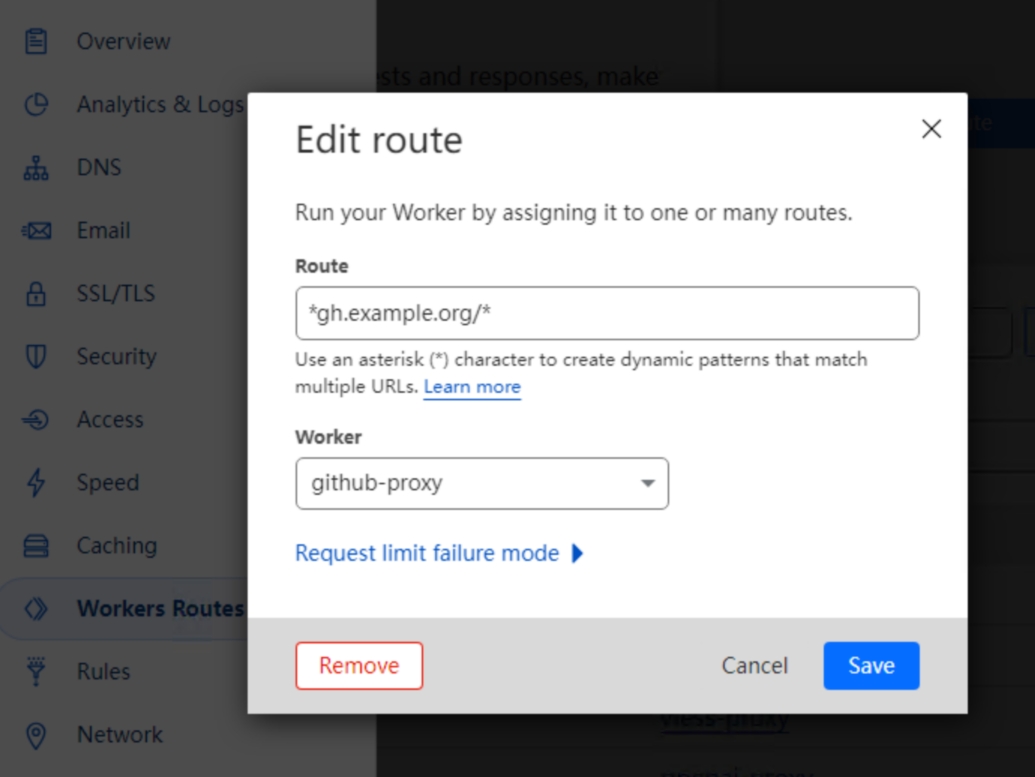
- 部署 Worker 后,添加一个
*gh.example.org/*的路由到这个 Worker - 请确保
*.example.org或*gh.example.org已解析到 Cloudflare - 现在,就可以通过
gh.example.org访问加速后的 Github 了
结语
通过 Cloudflare Worker,我们成功实现了无服务器加速 GitHub 访问的方案。这样的优化可以显著提升在中国地区的 GitHub 使用体验,同时确保代码和资源的快速加载。这个方案也可以作为其他类似需求的参考,为用户提供更为稳定和快速的访问服务。
Uncaught SyntaxError: Unexpected token 'export'
测试无错误,应该是你的执行环境不支持es6
博主你好,我复制你的代码到worker,但提示这个参数u和b提示下面错误怎么修改!
if (url.pathname.startsWith(u)) {
return new Response(b, { status: s });
}
Argument of type 'string | number' is not assignable to parameter of type 'string'.
Type 'number' is not assignable to type 'string'.ts(2345)
忽略即可,这是一个数组元素类型推断问题,不影响代码执行。
问题已解决,谢谢博主提供的代码
搭建后样式缺失 请问域名解析需要怎么填才能解析完全
f12,查看所有失败的资源子域名,统一解析到cloudflare即可
搭建后 ,样式丢失,并且很慢
https://imgur.com/a/UxZyCNy
域名解析的不全导致的,将失败的子域名全部解析到cf即可